.png?width=300&height=58&name=Demo%20Account%20Logos%20(560%20x%20102%20px).png)
Platform: Web Application (Billing features) / Both (Communication)
User Type: Admin+Billing / Org Admin (for billing features)
Difficulty: Intermediate
Estimated Time: 20 minutes
Last Updated: September 2025
Quick Summary
Master professional billing presentation and streamlined client communication through Dayworkbook's integrated workflow. Learn how to leverage automatically-generated Billing Reports with embedded approved daywork sheets to create compelling invoice presentations that improve payment timing and strengthen client relationships.
What You'll Learn
- Create professional Billing Reports with automatically-attached approved daywork sheets for comprehensive client reference
- Understand how Billing Reports serve as invoice accompaniments at billing time (job completion or contract intervals)
- Present daywork charges transparently through integrated documentation that eliminates client questions
- Use Dayworkbook's streamlined billing workflow to enhance professional image and reduce administrative overhead
- Optimise billing presentation for faster payments and reduced queries through comprehensive built-in documentation
- Build long-term client relationships through consistent, professional billing presentation
Before You Start
Prerequisites:
- Approved daywork sheets ready for billing (work communication already completed through approval process)
- Company branding configured in Settings > My Business (logo, colours, contact details)
- Directory rates configured for accurate cost calculations
- Understanding of billing timing per client contract terms
You'll Need:
- Web application access (billing features are not available on mobile)
- Admin+Billing or Org Admin permissions for Billing Report generation
- Clear understanding of billing timing per client contract terms
- Contact information for relevant Client Representatives for billing delivery
⚠️ Watch Out: Billing features are only available via the web application and require appropriate user permissions
Understanding the Integrated Workflow
How Client Communication Now Works
The modern Dayworkbook workflow streamlines client communication by integrating it into the billing process:
During Work Phase:
- Daywork Documentation: Create comprehensive daywork sheets with photos and descriptions
- Client Approval: Submit sheets for client approval (the primary communication touchpoint)
- Professional Interaction: Client representatives review and approve work through established approval process
- Automatic Integration: Approved sheets automatically become part of billing documentation
At Billing Time:
- Comprehensive Billing Reports: Generate professional reports that automatically include all selected daywork sheets
- Invoice Accompaniment: Billing Reports serve as detailed backup documentation for invoices
- Complete Reference: Client representatives have full access to all previously-approved work documentation
- Streamlined Process: No separate communication templates needed - the Billing Report contains all necessary information
🎯 Key Point: The Billing Report now serves as the primary comprehensive communication document, eliminating the need for separate email templates and communication workflows
Benefits of the Integrated Approach
For Your Business:
- Reduced Administration: No need to create separate communication documents - Billing Reports contain everything
- Improved Accuracy: Direct integration ensures billing matches previously-approved work
- Professional Consistency: Every Billing Report maintains the same high standard of documentation
- Time Efficiency: Single document creation process for comprehensive billing presentation
For Clients:
- Complete Transparency: Full access to all approved daywork sheets within Billing Reports
- Easy Reference: Previously-approved documentation readily available for verification
- Reduced Queries: Comprehensive information prevents most billing questions
- Professional Experience: Consistent, high-quality billing presentation builds confidence
💡 Pro Tip: Since approved daywork sheets are automatically included, focus your energy on ensuring quality documentation during the work phase rather than billing communication
Step-by-Step Instructions
Step 1: Configure Professional Business Branding
Establish your professional image through consistent branding configuration:
Company Details Setup:
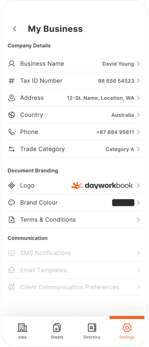
Navigate to Settings > My Business and configure:
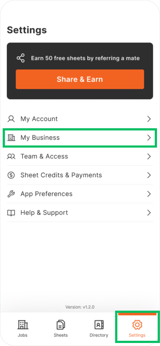
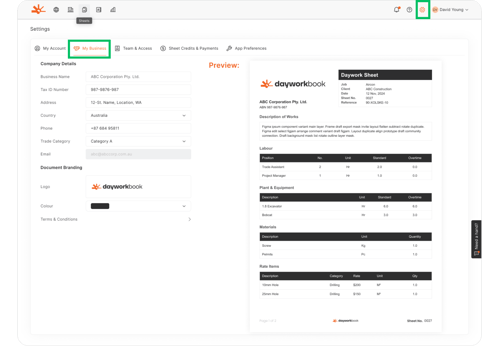
- Business Name: Full legal entity name for professional documentation
- Tax ID Number (TIN): ABN, GST, or relevant tax registration numbers
- Business Address: Complete postal address for legal and contact purposes
- Phone and Email: Professional contact information for client communication
- Trade Category: Industry classification for professional context
Document Branding Configuration:
- Logo Upload: High-quality company logo for document headers and professional presentation
- Primary Colour: Brand colour that appears throughout documents and interfaces
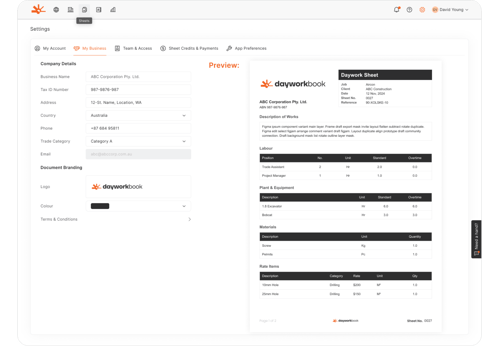
- Professional Preview: Review how your branding appears on daywork sheets and Billing Reports
Professional Branding Benefits:
- All Billing Reports display your company branding consistently
- Embedded daywork sheets maintain professional presentation
- Client communications reflect established business identity
- Documents suitable for formal business correspondence and record-keeping
Step 2: Ensure Quality Daywork Documentation
Since approved daywork sheets are automatically included in Billing Reports, focus on documentation quality during the work phase:
Professional Documentation Standards:
- Comprehensive Photos: Capture before, during, and after photos that tell the complete work story
- Detailed Descriptions: Clear, professional work descriptions that explain scope and achievements
- Accurate Resource Recording: Precise labour, equipment, materials, and rate item documentation
- Quality Context: Include information about standards met, challenges overcome, and value delivered
Client-Focused Content:
- Work Justification: Explain why work was necessary and how it was performed
- Quality Verification: Document compliance with standards and client expectations
- Problem Resolution: Show challenges identified and professional solutions implemented
- Value Demonstration: Highlight efficiency, quality, and additional value provided
🎯 Key Point: Since daywork sheets automatically become part of billing documentation, ensure they're client-ready during creation
Step 3: Generate Professional Billing Reports
Create comprehensive Billing Reports that serve as invoice or payment claim accompaniments:
Billing Report Creation Process:
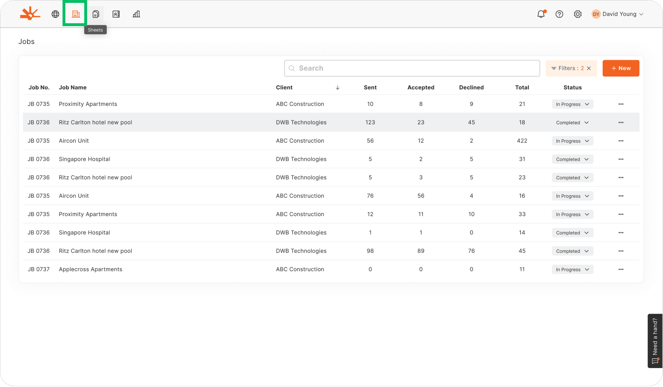
1. Access Billing Features: Navigate to Jobs section and select job with approved sheets
2. Select Billing Period: Choose approved sheets for the billing cycle (completion-based or contract interval)
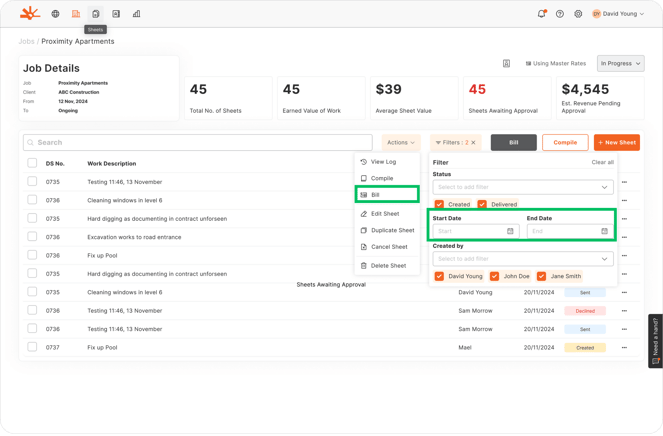
3. Generate Report: Create comprehensive Billing Report with automatic inclusion of approved daywork sheets
4. Professional Review: Verify that integrated documentation tells complete work story
What's Automatically Included:
- Cost Calculations: Automatic application of Directory rates to all documented resources
- Professional Formatting: Company branding and professional document presentation
- Complete Documentation: All approved daywork sheets with photos and descriptions
- Summary Information: Clear totals and cost breakdowns by resource category
- Client References: Quick access to all previously-approved work documentation
💡 Pro Tip: The Billing Report serves as a complete work history for the billing period - clients can reference all previously-approved documentation
Step 4: Present Billing Reports as Invoice/Claim Substantiation
Use Billing Reports as comprehensive backup documentation for invoices:
Billing Delivery Best Practices:
- Invoice Integration: Send Billing Report alongside invoice or payment claim as complete documentation package
- Professional Presentation: Leverage the comprehensive nature of integrated documentation
- Reference Clarity: Highlight that all work was previously approved by client representatives
- Payment Terms: Include clear payment terms and contact information for queries
Timing Considerations:
- Job Completion: Generate Billing Reports immediately upon project completion
- Contract Intervals: Create Billing Reports according to agreed billing schedule (monthly, milestone-based, etc.)
- Prompt Delivery: Distribute Billing Reports promptly to maintain cash flow
- Professional Follow-up: Handle any queries by referencing the comprehensive integrated documentation
Step 5: Leverage Integrated Documentation for Relationship Building
Use the comprehensive nature of Billing Reports to strengthen client relationships:
Trust Building Through Transparency:
- Complete Visibility: Clients have full access to all work documentation they previously approved
- Professional Consistency: Every Billing Report maintains the same high documentation standard
- Reliable Accuracy: A Client will never again have to check your claims for mistakes, speeding up their invoice/claim assessments. Adding up is done correctly every time, and rates are as per your master or job-specific Schedule of Rates.
- Historical Reference: Clients can review entire work history through integrated documentation
- Dispute Prevention: Comprehensive integrated documentation prevents billing questions
Business Development Opportunities:
- Quality Demonstration: Use comprehensive documentation to showcase professional standards
- Value Communication: Highlight challenges overcome and additional value delivered
- Capability Showcase: Demonstrate systematic approach to documentation and quality
- Future Project Foundation: Build confidence for larger or more complex future work
🎯 Key Point: Every Billing Report is a complete professional presentation that reinforces your business reputation
Understanding the Results
After implementing the integrated billing presentation approach, you should have:
- Streamlined Administration: Single document creation process for comprehensive billing
- Enhanced Professional Image: Consistent, high-quality billing presentation with integrated documentation
- Improved Client Satisfaction: Complete transparency through automatically-included approved documentation
- Reduced Billing Queries: Comprehensive information prevents most questions about work performed
- Faster Payment Processing: Clear, professional billing with complete backup documentation reducing the need for quality checks by Clients
- Stronger Business Relationships: Trust built through transparent, professional billing presentation
Your billing presentation now leverages the full power of integrated daywork documentation for maximum professional impact.
Troubleshooting Common Issues
Problem: Billing Reports missing expected daywork sheets
Cause: Sheets not approved by Client Representatives or incorrect date range selection
Solution: Verify all sheets are approved before Billing Report generation. Check date ranges match intended billing period. Only approved sheets can be included in Billing Reports.
Problem: Clients questioning billing despite comprehensive documentation
Cause: Possible confusion about billing timing or payment terms
Solution: Reference the integrated approved daywork sheets within the Billing Report. Remind clients that all work was previously approved by their representatives. Schedule brief discussion if needed.
Problem: Professional branding not appearing correctly in Billing Reports
Cause: Logo file format issues or branding configuration problems
Solution: Check logo file format and size requirements in Settings > My Business. Re-upload logo if necessary. Preview Billing Reports to ensure correct branding display.
Problem: Billing Reports taking excessive time to generate
Cause: Large number of sheets or extensive photo documentation
Solution: Generate Billing Reports in smaller batches if necessary. Ensure stable internet connection. The comprehensive nature of integrated documentation may require processing time.
Problem: Clients not receiving or accessing Billing Reports properly
Cause: Email delivery issues or client access problems
Solution: Verify client representative contact information. Consider multiple delivery methods. Ensure clients understand they have full access to previously-approved documentation.
What's Next?
With integrated billing presentation established, your next steps are:
- Quality Focus: Concentrate on daywork documentation quality since sheets automatically become billing documentation
- Billing Optimization: Refine billing timing and presentation based on client feedback and payment results
- Process Training: Ensure team understands that daywork quality directly impacts billing presentation
- Client Education: Help clients understand the integrated approach and comprehensive documentation available
Related Articles
- Billing Reports - Professional Client Invoicing - Technical process for generating comprehensive Billing Reports with integrated documentation
- Client Approval Process and Workflows - Understanding how quality approval creates foundation for billing presentation
- Professional Progress Documentation - Creating compelling daywork documentation that serves as billing backup
- Managing Client Relationships and Representatives - Optimizing client interactions through integrated workflow
Still Need Help?
If this article didn't solve your issue:
- Check "Billing Reports - Professional Client Invoicing" for technical guidance on report generation with integrated documentation
- Review "Client Approval Process and Workflows" for optimizing the foundation of integrated billing presentation
- Contact support via website or in-app chat
- Contact us via https://dayworkbook.com/contact/